 PostStride
A LITTLE PLAN. A BIGGER PRESENCE.
Your content.
One step ahead.
A publishing workspace for creators and small businesses. Prepare your photos and videos, choose your connected accounts, and follow every delivery.
PostStride is currently invitation-only. Request workspace access.
THE PRODUCT, UP CLOSE
Three places.
One considered workflow.
These are screens from the working PostStride app, using a designated test account and sample content. Explore the tools you will use from connection to delivery.
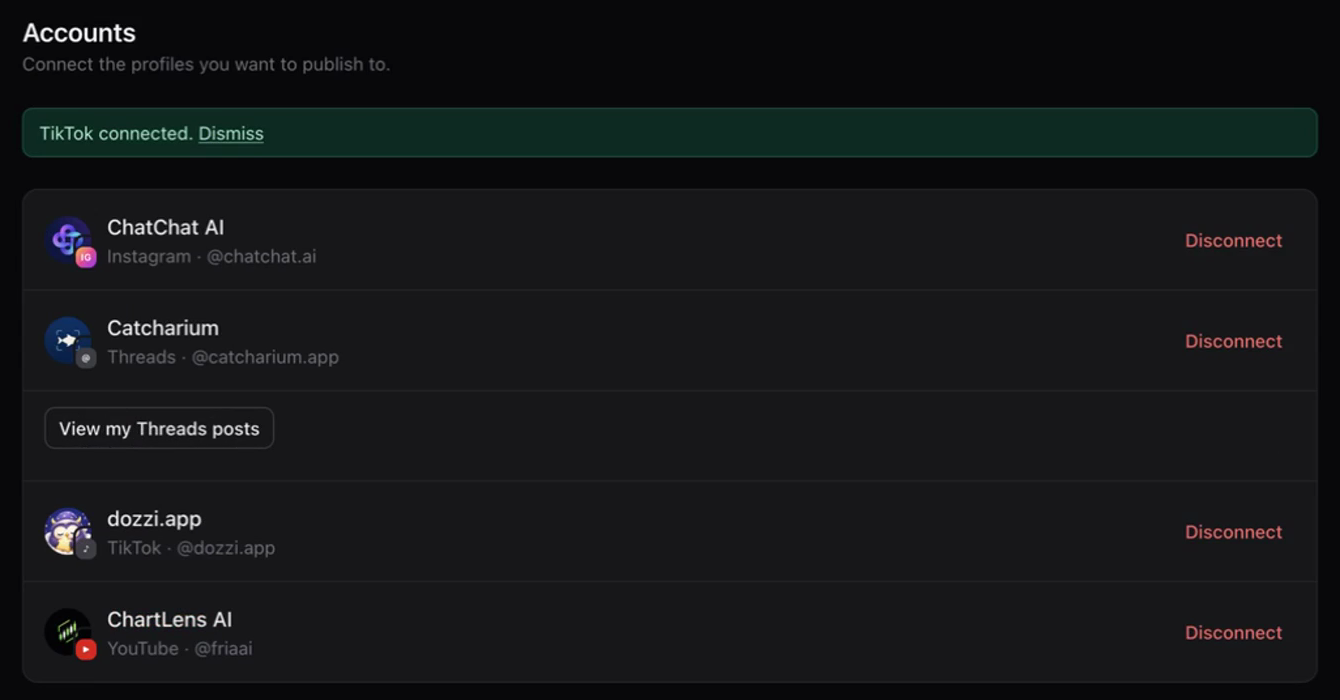
Know exactly where your content is going.
Connect the profiles you manage and check the account name and handle before preparing a post. Each connection starts on the platform’s own authorization screen.
- See your connected profiles in one place.
- Reconnect an account when its permission needs attention.
- Disconnect a destination from PostStride when you no longer need it.
FROM FILE TO FINISHED POST
A clear path for every
piece of content.
Use PostStride for the content and profiles you manage: a creator’s next video, a maker’s product update or a small business’s weekly posts.
- 01 / ACCOUNTS
Sign in. Then connect.
Open your invited workspace and connect a social account through that platform’s authorization screen. Check its name and handle in Accounts. Your workspace login and social connections are separate.
- 02 / NEW POST
Prepare your content.
Select the destinations, add media you have the right to share and write your caption. Review the preview and the options shown for each platform. Resolve any media requirements before submitting.
- 03 / DELIVERY
Choose when it goes.
Send it now or choose a future date and time. Confirm the destination and delivery mode. Scheduled work appears in Queue and runs in the background; processing time varies by platform.
- 04 / QUEUE
Follow the result.
Check Queue for progress and the destination’s response. Open the platform when a final step is needed. For TikTok inbox deliveries, that means reviewing and finishing the post in TikTok.
TIKTOK, WITH A FINAL SAY
Prepare here.
Finish in TikTok.
PostStride sends your selected video or photos to your TikTok inbox. Open the notification in the TikTok app to review, edit and decide whether to post.
Read the step-by-step TikTok guideWhat “Sent to inbox” means
TikTok has confirmed delivery to your inbox. The content still needs your attention in the TikTok app; it has not been posted publicly by PostStride.
A note about captions
For inbox videos, add the caption inside TikTok before posting. The caption drafted in PostStride stays with your PostStride record.
Current availability
TikTok access is limited to designated test accounts while production access is being prepared. Direct posting is currently unavailable.
YOUR CHANNELS
Different destinations.
Clear expectations.
Choose the platforms that fit your content. Available connections and delivery options depend on your account type and each platform’s access requirements.
- Connect a Business or Creator account to prepare supported photo and video posts.
- Threads
- Prepare text, photos, videos and carousels for your connected profile. View your own recent posts in Accounts.
- YouTube
- Connect a channel separately from Google sign-in. Upload or schedule videos; current uploads arrive as private videos for review in YouTube Studio.
- TikTok
- Send selected media to your inbox and finish in the TikTok app. Currently available to designated test accounts.
ABOUT POSTSTRIDE
Your work.
Your connections.
Your control.
PostStride is operated by LLAMA AI LTD. We build tools to help creators and small businesses prepare their own content and manage delivery across their connected profiles.
For workspace access, product help, delivery questions or privacy requests, contact support@poststride.app.
For a delivery question, include the affected platform, approximate time and the message shown in Queue. Please keep passwords and authorization codes private.
How do I get access?
Workspace access is by invitation. Email support@poststride.app with the platforms you use and what you would like to prepare. If you already have an account, sign in to your workspace. TikTok testing access is arranged separately.
Does PostStride need my social account password?
You authorize a connection on the platform’s own website. PostStride receives the permissions needed for that connection and the profile details you authorize. It does not ask you to enter a social account password into PostStride.
Can I change my mind about a delivery?
Cancel a scheduled post from Queue before it starts processing. Disconnecting an account stops pending deliveries to that connection. Posts already published on a social platform stay there.
Can I remove a connected account?
Use Accounts → Disconnect to remove its saved connection from PostStride. To revoke TikTok’s authorization, also remove PostStride in TikTok’s app-permission settings.
How do I delete my data?
Accounts includes account deletion with a confirmation step and cleanup status. Our deletion instructions explain what is removed, backup retention and how to contact us.
Is delivery the same as a public post?
It depends on the platform. TikTok inbox content needs completion in the TikTok app. YouTube uploads can still be processing or private. Follow the destination-specific status and instructions in Queue.
MAKE ROOM FOR YOUR NEXT POST
A little more prepared.
Already invited? Your workspace is ready when you are.